
Download AI Greem – AI‑Powered Art Generator, Free & Secure
Overview & Key Benefits
AI Greem is a cutting‑edge, web‑based AI art generator that transforms textual prompts into striking, original artwork in seconds. Designed for both seasoned designers and casual hobbyists, the platform eliminates the need for expensive hardware or deep learning expertise. By simply typing a description such as “a neon cityscape at dusk in the style of Blade Runner,” the engine interprets style, composition, lighting, and color palette to deliver a high‑quality image that mirrors the requested aesthetic.
The built‑in upscaling feature boosts resolution without compromising detail, making every output ready for print, social media, or commercial projects. AI Greem’s intuitive interface offers model selection, size adjustment, and batch generation controls, giving users granular creative freedom while keeping the learning curve shallow. A privacy‑first architecture ensures that generated images remain the user’s intellectual property; no hidden data mining or storage of prompts occurs.
In short, AI Greem democratizes professional‑grade art creation, providing a free, secure, and instantly accessible tool that bridges imagination and visual reality for anyone with an internet connection.
Core Features & Customization Options
AI Greem packs a robust set of capabilities that cater to a wide range of creative scenarios. Whether you need quick concept sketches, detailed illustrations, or experimental abstract pieces, the platform’s flexible feature set lets you fine‑tune every aspect of the generation process. The following list outlines the most important functionalities, each built to maximize artistic control while preserving ease of use.
- Prompt‑Driven Image Generation: Convert natural‑language descriptions into artwork, supporting complex style directives and nuanced artistic references.
- Multiple Generation Models: Choose from a library of AI models optimized for realism, illustration, abstract expression, or specific historical periods such as Renaissance or Pop Art.
- Resolution & Size Controls: Set custom output dimensions (e.g., 512×512, 1024×1024, or even 4K) to match the technical requirements of your project.
- Batch Generation: Generate up to 10 variations per request, ideal for exploring multiple concepts or building a cohesive visual series.
- AI‑Powered Upscaling: Enhance low‑resolution results to high‑definition quality with a single click, preserving detail and texture.
- Style & Theme Filters: Apply predefined filters such as “impressionist,” “cyberpunk,” “minimalist,” or custom mood boards to steer the AI’s creative direction.
- Download & Export Options: Save images in PNG (lossless) or JPEG (compressed) formats, with optional metadata embedding for professional workflows.
- Privacy‑Centric Architecture: All generated content stays on your device; the platform does not retain or sell images or prompts.
- Responsive Web Interface: Works seamlessly on desktops, tablets, and smartphones without any installation or plug‑ins.
- Continuous Updates: Regular model improvements, new style filters, and UI enhancements are delivered automatically, ensuring the tool stays current with AI research.
These features combine to form a versatile toolkit that can support everything from rapid prototyping for marketing teams to detailed artwork for independent game developers. By offering both breadth and depth, AI Greem positions itself as a go‑to solution for anyone seeking high‑quality, AI‑generated visuals.
Installation, Usage & Compatibility
Because AI Greem is a cloud‑hosted web application, there is no traditional installation process. You can begin creating artwork the moment you launch a supported browser. Below is a comprehensive guide that walks you through every step, from opening the site to exporting your final image, along with tips for optimal performance.
Step‑by‑Step Usage Guide
- Open Your Browser: Launch any modern browser—Chrome, Edge, Firefox, or Safari—on Windows, macOS, Android, or iOS. For the best experience, ensure the browser is up to date and that JavaScript is enabled.
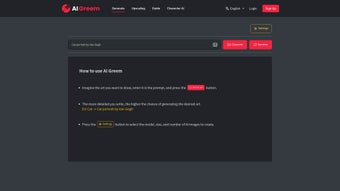
- Visit the AI Greem Site: Navigate to www.ai-greem.com. The homepage loads a clean prompt field and a configuration panel on the right side.
- Enter Your Prompt: Type a detailed description, for example, “a surreal forest with floating lanterns, painted in the style of Studio Ghibli.” Specific adjectives help the model understand lighting, mood, and composition.
- Select a Model: Choose a generation model from the dropdown menu—Realistic, Cartoon, Abstract, or Historical. Each model has its own strengths; Realistic excels at photo‑like detail, while Cartoon emphasizes stylized lines.
- Adjust Settings: Set the desired image size, number of variations, and toggle the upscaling option if you need a higher‑resolution output. You can also enable “Style Filters” to apply thematic presets.
- Generate: Click the “Create” button. Within a few seconds, the AI returns a gallery of images that match your criteria. If the results are not perfect, you can quickly iterate by editing the prompt.
- Review & Refine: Use the “Regenerate” or “Edit Prompt” buttons to fine‑tune the output without starting from scratch. This iterative workflow speeds up creative exploration.
- Download: Click the download icon beneath any image to save it locally. Choose PNG for lossless quality or JPEG for smaller file sizes. The platform also offers a bulk‑download option for batch‑generated sets.
Compatibility: AI Greem runs on any device with an internet connection and a modern web browser. It is fully optimized for Windows 10/11, macOS Ventura and later, Android 8+ and iOS 13+. No additional plugins, drivers, or local installations are required, making it a truly cross‑platform solution that works equally well on laptops, desktop PCs, tablets, and smartphones.
For users on slower connections, we recommend disabling high‑resolution previews in the settings menu; the generator will still produce full‑size files, but the on‑screen preview will load faster. Additionally, clearing browser cache periodically can prevent occasional rendering glitches.
Pros, Cons & Frequently Asked Questions
Pros
- Free to use with no hidden fees, making professional‑grade AI art accessible to everyone.
- Instant, cloud‑based generation eliminates the need for powerful local hardware.
- Highly customizable prompts, model selection, and style filters provide creative flexibility.
- Built‑in AI upscaling delivers print‑ready resolution without extra software.
- Strong privacy stance—your images and prompts are not stored on the server.
- Responsive design works seamlessly across Windows, macOS, Android, and iOS.
- Regular updates keep the models and UI aligned with the latest AI research.
Cons
- Requires an active internet connection; offline generation is not available.
- Free tier imposes a daily generation cap (approximately 20 images), which may limit heavy users.
- Advanced model fine‑tuning and higher generation limits are locked behind a paid subscription.
- Complex or ambiguous prompts sometimes need several iterations to achieve the desired result.
- Performance can vary on older mobile browsers, potentially leading to longer render times.
FAQ – Your Questions Answered
Is AI Greem really free?
Yes, the core features—including prompt generation, model selection, and upscaling—are completely free. A premium plan is available for higher volume users and access to exclusive models.
Do I need to create an account?
No account is required for the free tier. You can start generating art instantly. Signing up is optional and only needed for saving preferences or unlocking premium features.
Can I use the generated images commercially?
Absolutely. AI Greem’s privacy policy grants you full ownership of every image you create, allowing commercial use without royalty fees.
What file formats are supported for download?
Images can be downloaded as high‑quality PNG (lossless) or compressed JPEG. The upscaling tool preserves PNG transparency when needed.
How secure is my data during generation?
All communication is encrypted via HTTPS. The platform does not store your prompts or generated files on its servers beyond the short processing window, ensuring privacy and security.
Can I integrate AI Greem into my workflow with APIs?
A public API is currently in beta and available to premium subscribers. It allows programmatic image generation, making it easy to embed AI Greem into design pipelines, content management systems, or custom applications.
Final Verdict & Call to Action
AI Greem stands out as a versatile, user‑friendly AI art generator that delivers professional‑grade results without demanding technical expertise or expensive hardware. Its free tier is generous enough for casual creators, while the premium upgrade provides power users with higher limits, exclusive models, and API access. The combination of prompt flexibility, built‑in upscaling, and strict privacy safeguards makes AI Greem a compelling choice for designers, marketers, educators, and anyone eager to experiment with AI‑driven visual content. Ready to turn your ideas into eye‑catching artwork? Visit AI Greem now, type your first prompt, and experience the future of creative expression—free, fast, and secure.
Overall Rating: 4.7 / 5



.png)



